> ## Documentation Index
> Fetch the complete documentation index at: https://docs-dev-fix-tenant-logs-locale-nav.mintlify.site/llms.txt
> Use this file to discover all available pages before exploring further.

# Coffre-fort

> Décrit comment utiliser le coffre-fort de formulaires pour les actions.

Le coffre-fort vous permet de stocker de manière sécurisée des secrets ou des paramètres courants (par exemple : clés API, jetons d’accès, jetons d’actualisation) pour authentifier les demandes auprès de services externes ou des intégrations en tant que connexions de coffre-fort.

<Callout icon="file-lines" color="#0EA5E9" iconType="regular">
  * Certaines connexions exigent que l’utilisateur fournisse des informations d’identification (par exemple, dans le cas d’une connexion Auth0 avec une application machine-machine (M-M), un jeton d’accès est généré avec un délai d’expiration et un jeton d’actualisation). La connexion stocke les deux jetons et génère un nouveau jeton d’accès avant son expiration.
  * Certains services externes requièrent des permissions pour générer des identifiants d’API. Si vous modifiez les permissions, mettez à jour la connexion à ces services pour éviter les problèmes de connexion.
  * Une fois la connexion ajoutée, vous pouvez l’utiliser dans vos flux. Toute mise à jour d’une connexion existante se propage automatiquement.
</Callout>

## Créer et modifier des connexions au coffre-fort

Créez et modifiez des connexions au coffre-fort depuis la page correspondante ou l’éditeur de flux lorsqu’une action nécessite des identifiants.

### Créer des connexions au coffre-fort depuis la page correspondante

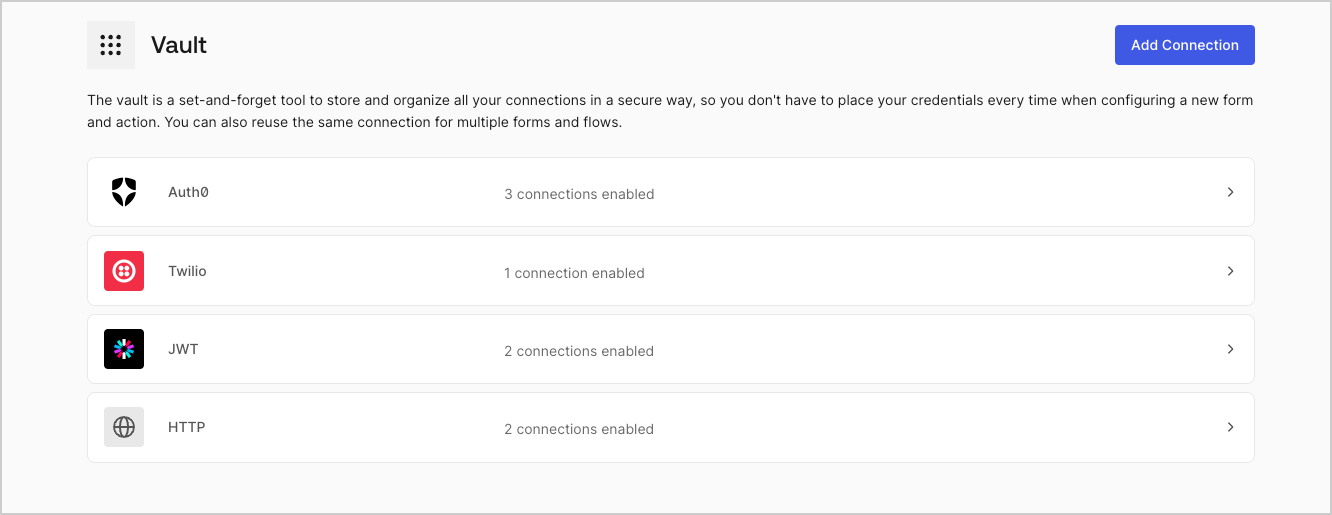
Ajoutez une connexion au coffre-fort depuis la page Coffre-fort en procédant comme suit :

1. Ouvrez l’éditeur de formulaires en sélectionnant **Auth0 Dashboard > Actions > Forms (Formulaires).**

2. En haut à gauche de l’écran, sélectionnez **{"{tenantName}"} > Vault (Coffre-fort)** pour ouvrir la page Vault.
   <Frame>
     <img src="https://mintcdn.com/docs-dev-fix-tenant-logs-locale-nav/edbeP1bBH6XXdS_8/docs/images/fr-ca/cdy7uua7fh8z/1sPNPKO6nuEDCuiYGRWSur/d85dc616170eaf2d7d5f321750863ccf/vault-connections-example.png?fit=max&auto=format&n=edbeP1bBH6XXdS_8&q=85&s=656854d79a53cc7249925c112db5e295" alt="Dashboard > Forms > Vault" data-og-width="1332" width="1332" data-og-height="515" height="515" data-path="docs/images/fr-ca/cdy7uua7fh8z/1sPNPKO6nuEDCuiYGRWSur/d85dc616170eaf2d7d5f321750863ccf/vault-connections-example.png" data-optimize="true" data-opv="3" srcset="https://mintcdn.com/docs-dev-fix-tenant-logs-locale-nav/edbeP1bBH6XXdS_8/docs/images/fr-ca/cdy7uua7fh8z/1sPNPKO6nuEDCuiYGRWSur/d85dc616170eaf2d7d5f321750863ccf/vault-connections-example.png?w=280&fit=max&auto=format&n=edbeP1bBH6XXdS_8&q=85&s=89c8eb08cbc1f9d301ebf86baa80ed24 280w, https://mintcdn.com/docs-dev-fix-tenant-logs-locale-nav/edbeP1bBH6XXdS_8/docs/images/fr-ca/cdy7uua7fh8z/1sPNPKO6nuEDCuiYGRWSur/d85dc616170eaf2d7d5f321750863ccf/vault-connections-example.png?w=560&fit=max&auto=format&n=edbeP1bBH6XXdS_8&q=85&s=c471871af5393efb763c775cdab10301 560w, https://mintcdn.com/docs-dev-fix-tenant-logs-locale-nav/edbeP1bBH6XXdS_8/docs/images/fr-ca/cdy7uua7fh8z/1sPNPKO6nuEDCuiYGRWSur/d85dc616170eaf2d7d5f321750863ccf/vault-connections-example.png?w=840&fit=max&auto=format&n=edbeP1bBH6XXdS_8&q=85&s=0cd002583ba573c876e3ac22ef5977aa 840w, https://mintcdn.com/docs-dev-fix-tenant-logs-locale-nav/edbeP1bBH6XXdS_8/docs/images/fr-ca/cdy7uua7fh8z/1sPNPKO6nuEDCuiYGRWSur/d85dc616170eaf2d7d5f321750863ccf/vault-connections-example.png?w=1100&fit=max&auto=format&n=edbeP1bBH6XXdS_8&q=85&s=9ba61e19eae18836b6409a7aecadae37 1100w, https://mintcdn.com/docs-dev-fix-tenant-logs-locale-nav/edbeP1bBH6XXdS_8/docs/images/fr-ca/cdy7uua7fh8z/1sPNPKO6nuEDCuiYGRWSur/d85dc616170eaf2d7d5f321750863ccf/vault-connections-example.png?w=1650&fit=max&auto=format&n=edbeP1bBH6XXdS_8&q=85&s=3b5df0947419b2976c670875dfb95e23 1650w, https://mintcdn.com/docs-dev-fix-tenant-logs-locale-nav/edbeP1bBH6XXdS_8/docs/images/fr-ca/cdy7uua7fh8z/1sPNPKO6nuEDCuiYGRWSur/d85dc616170eaf2d7d5f321750863ccf/vault-connections-example.png?w=2500&fit=max&auto=format&n=edbeP1bBH6XXdS_8&q=85&s=8e6f2ae4a26ed14f43892a9295ed5b0e 2500w" />
   </Frame>

3. Sélectionnez **Add Vault Connection (Ajouter une connexion au coffre-fort)**.

4. Sélectionnez l’action désirée, puis **Continue (Continuer)**.

5. Ajoutez un **Connection name (Nom de connexion)** au coffre-fort et sélectionnez **Continue (Continuer)**.

6. Saisissez les identifiants.
   Si vous n’avez pas d’identifiants précis, vous pouvez sélectionner **Create an empty connection (Créer une connexion vide)** et ajouter les identifiants plus tard. Les connexions vides affichent une icône orange qui indiquent l’absence d’identifiants.

7. Sélectionnez **Add Vault Connection (Ajouter une connexion au coffre-fort)**.

### Créer des connexions au coffre-fort depuis l’éditeur de flux

Ajoutez une connexion au coffre-fort à partir d’une action de flux, par exemple, Twilio, en procédant comme suit :

1. Ouvrez l’éditeur de flux en sélectionnant **Auth0 Dashboard > Actions > Forms (Formulaires) > Flows (Flux)**

2. Sélectionnez un flux et ajoutez une action **Send SMS with Twilio (Envoyer un SMS avec Twilio)**.

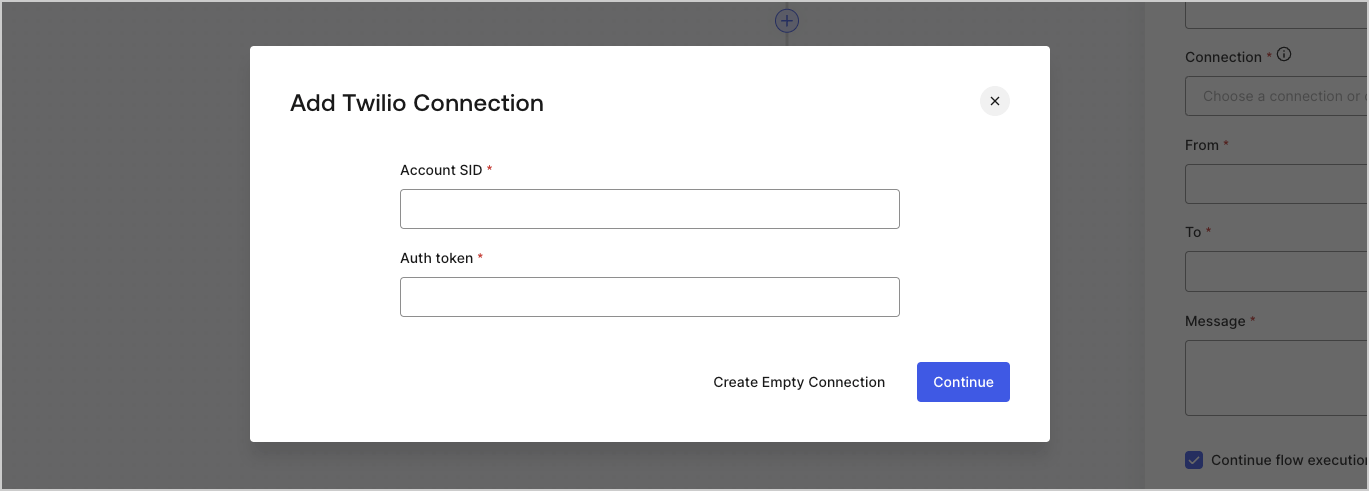
3. Dans le paramètre **Vault connection (Connexion au coffre-fort)** de l’action, sélectionnez l’icône **+**.

   <Frame>
     <img src="https://mintcdn.com/docs-dev-fix-tenant-logs-locale-nav/IyG5tHJ5oJiYSq4r/docs/images/fr-ca/cdy7uua7fh8z/1AsaznhRKxm5LZxPlcbfUw/10e5a8af700aab909f5b03fcd266da7e/twilio-vault-connection.png?fit=max&auto=format&n=IyG5tHJ5oJiYSq4r&q=85&s=61951e3fcfd8ec04ee8f308fa1da19ae" alt="Dashboard > Forms > Vault " data-og-width="1104" width="1104" data-og-height="191" height="191" data-path="docs/images/fr-ca/cdy7uua7fh8z/1AsaznhRKxm5LZxPlcbfUw/10e5a8af700aab909f5b03fcd266da7e/twilio-vault-connection.png" data-optimize="true" data-opv="3" srcset="https://mintcdn.com/docs-dev-fix-tenant-logs-locale-nav/IyG5tHJ5oJiYSq4r/docs/images/fr-ca/cdy7uua7fh8z/1AsaznhRKxm5LZxPlcbfUw/10e5a8af700aab909f5b03fcd266da7e/twilio-vault-connection.png?w=280&fit=max&auto=format&n=IyG5tHJ5oJiYSq4r&q=85&s=4b68fc3e8ce0644b1179d11d38312ef7 280w, https://mintcdn.com/docs-dev-fix-tenant-logs-locale-nav/IyG5tHJ5oJiYSq4r/docs/images/fr-ca/cdy7uua7fh8z/1AsaznhRKxm5LZxPlcbfUw/10e5a8af700aab909f5b03fcd266da7e/twilio-vault-connection.png?w=560&fit=max&auto=format&n=IyG5tHJ5oJiYSq4r&q=85&s=97c2612f990fb6ce9009d724dd3a6f68 560w, https://mintcdn.com/docs-dev-fix-tenant-logs-locale-nav/IyG5tHJ5oJiYSq4r/docs/images/fr-ca/cdy7uua7fh8z/1AsaznhRKxm5LZxPlcbfUw/10e5a8af700aab909f5b03fcd266da7e/twilio-vault-connection.png?w=840&fit=max&auto=format&n=IyG5tHJ5oJiYSq4r&q=85&s=f6149bed1fdfd20e140775abdb4cce76 840w, https://mintcdn.com/docs-dev-fix-tenant-logs-locale-nav/IyG5tHJ5oJiYSq4r/docs/images/fr-ca/cdy7uua7fh8z/1AsaznhRKxm5LZxPlcbfUw/10e5a8af700aab909f5b03fcd266da7e/twilio-vault-connection.png?w=1100&fit=max&auto=format&n=IyG5tHJ5oJiYSq4r&q=85&s=09a41459867694a39cbcafce58a9a977 1100w, https://mintcdn.com/docs-dev-fix-tenant-logs-locale-nav/IyG5tHJ5oJiYSq4r/docs/images/fr-ca/cdy7uua7fh8z/1AsaznhRKxm5LZxPlcbfUw/10e5a8af700aab909f5b03fcd266da7e/twilio-vault-connection.png?w=1650&fit=max&auto=format&n=IyG5tHJ5oJiYSq4r&q=85&s=73101f6458d7407e7d8a5349dc337d35 1650w, https://mintcdn.com/docs-dev-fix-tenant-logs-locale-nav/IyG5tHJ5oJiYSq4r/docs/images/fr-ca/cdy7uua7fh8z/1AsaznhRKxm5LZxPlcbfUw/10e5a8af700aab909f5b03fcd266da7e/twilio-vault-connection.png?w=2500&fit=max&auto=format&n=IyG5tHJ5oJiYSq4r&q=85&s=ec85197faca883d4311457159d86eb7d 2500w" />
   </Frame>

4. Ajoutez un **Connection name (Nom de connexion)** au coffre-fort et sélectionnez **Continue (Continuer)**.

5. Saisissez les identifiants.
   Si vous n’avez pas d’identifiants précis, vous pouvez sélectionner **Create an empty connection (Créer une connexion vide)** et ajouter les identifiants plus tard. Les connexions vides affichent une icône orange qui indiquent l’absence d’identifiants.
   <Frame>
     <img src="https://mintcdn.com/docs-dev-fix-tenant-logs-locale-nav/PrsQoUkx8_2lGRDi/docs/images/fr-ca/cdy7uua7fh8z/yobXanutPRCO3FWek8cOk/bc29e39fb8593cff35e2738234bfe6fe/twilio-vault-settings.png?fit=max&auto=format&n=PrsQoUkx8_2lGRDi&q=85&s=6bcc5c799692a3cdc9c55012ca727176" alt="Dashboard > Forms > Vault > Twilio connection settings" data-og-width="1369" width="1369" data-og-height="491" height="491" data-path="docs/images/fr-ca/cdy7uua7fh8z/yobXanutPRCO3FWek8cOk/bc29e39fb8593cff35e2738234bfe6fe/twilio-vault-settings.png" data-optimize="true" data-opv="3" srcset="https://mintcdn.com/docs-dev-fix-tenant-logs-locale-nav/PrsQoUkx8_2lGRDi/docs/images/fr-ca/cdy7uua7fh8z/yobXanutPRCO3FWek8cOk/bc29e39fb8593cff35e2738234bfe6fe/twilio-vault-settings.png?w=280&fit=max&auto=format&n=PrsQoUkx8_2lGRDi&q=85&s=8b367230bc19c2cb9a78bbc9c3935c3a 280w, https://mintcdn.com/docs-dev-fix-tenant-logs-locale-nav/PrsQoUkx8_2lGRDi/docs/images/fr-ca/cdy7uua7fh8z/yobXanutPRCO3FWek8cOk/bc29e39fb8593cff35e2738234bfe6fe/twilio-vault-settings.png?w=560&fit=max&auto=format&n=PrsQoUkx8_2lGRDi&q=85&s=acf8e9760e2886c3fc0cce7a6f32a532 560w, https://mintcdn.com/docs-dev-fix-tenant-logs-locale-nav/PrsQoUkx8_2lGRDi/docs/images/fr-ca/cdy7uua7fh8z/yobXanutPRCO3FWek8cOk/bc29e39fb8593cff35e2738234bfe6fe/twilio-vault-settings.png?w=840&fit=max&auto=format&n=PrsQoUkx8_2lGRDi&q=85&s=e2cd625e1e0d1a0efd3169b16d6675bf 840w, https://mintcdn.com/docs-dev-fix-tenant-logs-locale-nav/PrsQoUkx8_2lGRDi/docs/images/fr-ca/cdy7uua7fh8z/yobXanutPRCO3FWek8cOk/bc29e39fb8593cff35e2738234bfe6fe/twilio-vault-settings.png?w=1100&fit=max&auto=format&n=PrsQoUkx8_2lGRDi&q=85&s=5e08db6ceace857580f5833c071a4fd7 1100w, https://mintcdn.com/docs-dev-fix-tenant-logs-locale-nav/PrsQoUkx8_2lGRDi/docs/images/fr-ca/cdy7uua7fh8z/yobXanutPRCO3FWek8cOk/bc29e39fb8593cff35e2738234bfe6fe/twilio-vault-settings.png?w=1650&fit=max&auto=format&n=PrsQoUkx8_2lGRDi&q=85&s=6c7090116e88310295aaf75b48986dc3 1650w, https://mintcdn.com/docs-dev-fix-tenant-logs-locale-nav/PrsQoUkx8_2lGRDi/docs/images/fr-ca/cdy7uua7fh8z/yobXanutPRCO3FWek8cOk/bc29e39fb8593cff35e2738234bfe6fe/twilio-vault-settings.png?w=2500&fit=max&auto=format&n=PrsQoUkx8_2lGRDi&q=85&s=7475576df3482673878d3f972fc1c179 2500w" />
   </Frame>

6. Sélectionnez **Add Vault Connection (Ajouter une connexion au coffre-fort)**.
