> ## Documentation Index
> Fetch the complete documentation index at: https://docs-dev-fix-tenant-logs-locale-nav.mintlify.site/llms.txt
> Use this file to discover all available pages before exploring further.

> Configure an update policy form using Forms for Actions

# Use Cases: Configure an update policy form using Forms

<Card title="Before you start">
  1. Create a [Machine-to-Machine Application](/docs/get-started/auth0-overview/create-applications/machine-to-machine-apps) with the following scopes enabled:

  * `read:users`
  * `update:users`
  * `create:users`
  * `read:users_app_metadata`
  * `update:users_app_metadata`
  * `create:users_app_metadata`

  2. Add a [Vault connection](/docs/customize/forms/vault) using the M2M application credentials.
</Card>

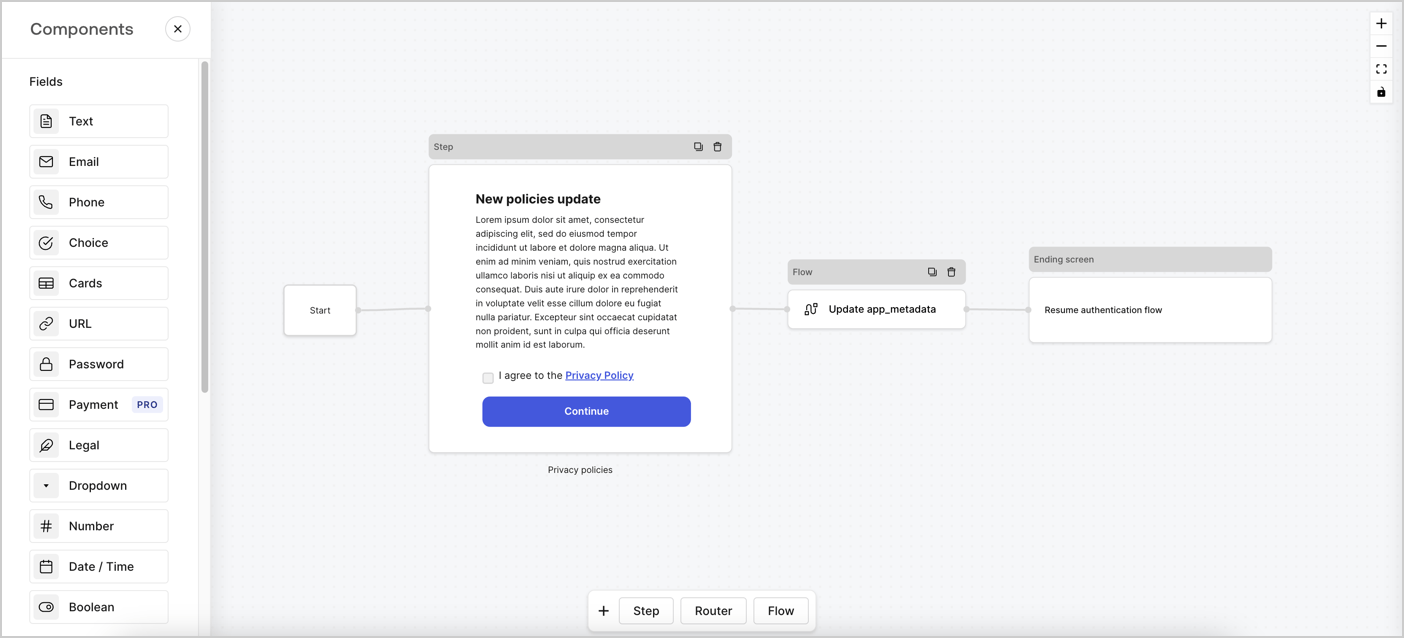
Forms for Actions allows you to create custom privacy policies flows and store the consent under the `app_metadata` object.
<Frame>
  <img src="https://mintcdn.com/docs-dev-fix-tenant-logs-locale-nav/CTyFZc_GC2Gh-lke/docs/images/cdy7uua7fh8z/6i68dMvHDTijfRmSgN1x8Q/ad900e7d4c0fb34645921435472b8684/privavy-policy-form.png?fit=max&auto=format&n=CTyFZc_GC2Gh-lke&q=85&s=8e0eacc6f97b733924ba0f60aabcf2c8" alt="Dashboard > Actions > Forms > Privacy policy use case" data-og-width="1404" width="1404" data-og-height="638" height="638" data-path="docs/images/cdy7uua7fh8z/6i68dMvHDTijfRmSgN1x8Q/ad900e7d4c0fb34645921435472b8684/privavy-policy-form.png" data-optimize="true" data-opv="3" srcset="https://mintcdn.com/docs-dev-fix-tenant-logs-locale-nav/CTyFZc_GC2Gh-lke/docs/images/cdy7uua7fh8z/6i68dMvHDTijfRmSgN1x8Q/ad900e7d4c0fb34645921435472b8684/privavy-policy-form.png?w=280&fit=max&auto=format&n=CTyFZc_GC2Gh-lke&q=85&s=f99b678c52f56c59fe1c07e9fba10a0e 280w, https://mintcdn.com/docs-dev-fix-tenant-logs-locale-nav/CTyFZc_GC2Gh-lke/docs/images/cdy7uua7fh8z/6i68dMvHDTijfRmSgN1x8Q/ad900e7d4c0fb34645921435472b8684/privavy-policy-form.png?w=560&fit=max&auto=format&n=CTyFZc_GC2Gh-lke&q=85&s=2913fef3ec2c5c57fa67ea85597df444 560w, https://mintcdn.com/docs-dev-fix-tenant-logs-locale-nav/CTyFZc_GC2Gh-lke/docs/images/cdy7uua7fh8z/6i68dMvHDTijfRmSgN1x8Q/ad900e7d4c0fb34645921435472b8684/privavy-policy-form.png?w=840&fit=max&auto=format&n=CTyFZc_GC2Gh-lke&q=85&s=2528d4268a33ca24d310a8df247da2a1 840w, https://mintcdn.com/docs-dev-fix-tenant-logs-locale-nav/CTyFZc_GC2Gh-lke/docs/images/cdy7uua7fh8z/6i68dMvHDTijfRmSgN1x8Q/ad900e7d4c0fb34645921435472b8684/privavy-policy-form.png?w=1100&fit=max&auto=format&n=CTyFZc_GC2Gh-lke&q=85&s=a4cbd3f3e624f350f82c4c9fc36ebdb0 1100w, https://mintcdn.com/docs-dev-fix-tenant-logs-locale-nav/CTyFZc_GC2Gh-lke/docs/images/cdy7uua7fh8z/6i68dMvHDTijfRmSgN1x8Q/ad900e7d4c0fb34645921435472b8684/privavy-policy-form.png?w=1650&fit=max&auto=format&n=CTyFZc_GC2Gh-lke&q=85&s=5187c31532cdcd25692803290281c284 1650w, https://mintcdn.com/docs-dev-fix-tenant-logs-locale-nav/CTyFZc_GC2Gh-lke/docs/images/cdy7uua7fh8z/6i68dMvHDTijfRmSgN1x8Q/ad900e7d4c0fb34645921435472b8684/privavy-policy-form.png?w=2500&fit=max&auto=format&n=CTyFZc_GC2Gh-lke&q=85&s=a614c60f195203ce488842de9faada3c 2500w" />
</Frame>

The sections below outline how you can create an Update Policy form using nodes and flows, along with steps for adding your form to a [Post Login](/docs/customize/actions/explore-triggers/signup-and-login-triggers/login-trigger) Action.

## Create a form from scratch

Follow these steps to create a form to gather information:

1. Open the Form editor by selecting **Auth0 Dashboard > Actions > Forms.**
2. Select **Create Form** > **Start from scratch**.

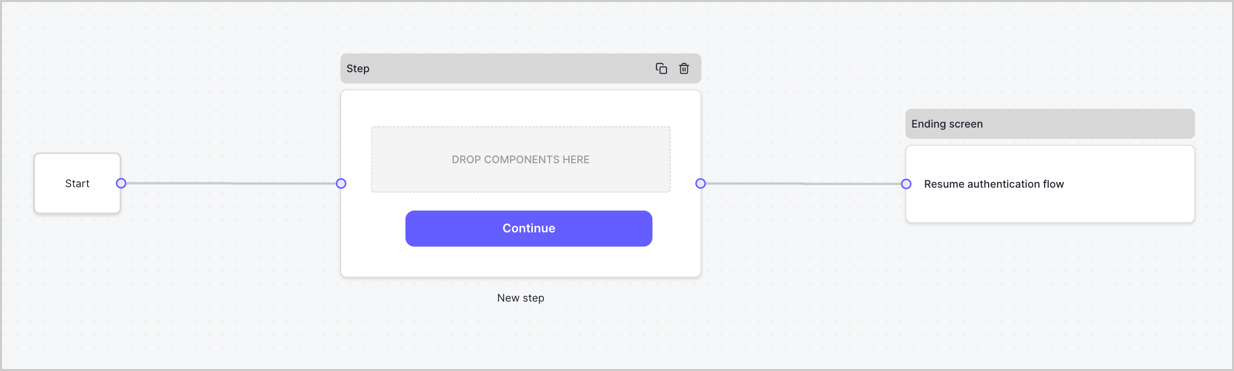
By default, a new form contains a Start node, a Step node, and an Ending screen node.
<Frame>
  <img src="https://mintcdn.com/docs-dev-fix-tenant-logs-locale-nav/Hl-MA9ej0Hlrf492/docs/images/cdy7uua7fh8z/2TZ9jSjgEcARFpULI6hz4R/a4319a1bd482f2ee5cc23100fdb2f42c/New-form-Forms-for-action-use-case.png?fit=max&auto=format&n=Hl-MA9ej0Hlrf492&q=85&s=9a198cc3821070a9c1761f247077d29f" alt="Dashboard > Forms > Use Cases > Form" data-og-width="1234" width="1234" data-og-height="371" height="371" data-path="docs/images/cdy7uua7fh8z/2TZ9jSjgEcARFpULI6hz4R/a4319a1bd482f2ee5cc23100fdb2f42c/New-form-Forms-for-action-use-case.png" data-optimize="true" data-opv="3" srcset="https://mintcdn.com/docs-dev-fix-tenant-logs-locale-nav/Hl-MA9ej0Hlrf492/docs/images/cdy7uua7fh8z/2TZ9jSjgEcARFpULI6hz4R/a4319a1bd482f2ee5cc23100fdb2f42c/New-form-Forms-for-action-use-case.png?w=280&fit=max&auto=format&n=Hl-MA9ej0Hlrf492&q=85&s=e4e27bb9f52e715c1d6f446afca4ef4b 280w, https://mintcdn.com/docs-dev-fix-tenant-logs-locale-nav/Hl-MA9ej0Hlrf492/docs/images/cdy7uua7fh8z/2TZ9jSjgEcARFpULI6hz4R/a4319a1bd482f2ee5cc23100fdb2f42c/New-form-Forms-for-action-use-case.png?w=560&fit=max&auto=format&n=Hl-MA9ej0Hlrf492&q=85&s=f2d1f47c60ac7924c008745558305a44 560w, https://mintcdn.com/docs-dev-fix-tenant-logs-locale-nav/Hl-MA9ej0Hlrf492/docs/images/cdy7uua7fh8z/2TZ9jSjgEcARFpULI6hz4R/a4319a1bd482f2ee5cc23100fdb2f42c/New-form-Forms-for-action-use-case.png?w=840&fit=max&auto=format&n=Hl-MA9ej0Hlrf492&q=85&s=5079ff8a5c6e5439f81ec4f613a90e3e 840w, https://mintcdn.com/docs-dev-fix-tenant-logs-locale-nav/Hl-MA9ej0Hlrf492/docs/images/cdy7uua7fh8z/2TZ9jSjgEcARFpULI6hz4R/a4319a1bd482f2ee5cc23100fdb2f42c/New-form-Forms-for-action-use-case.png?w=1100&fit=max&auto=format&n=Hl-MA9ej0Hlrf492&q=85&s=5877d145146b2476c36c79880769612f 1100w, https://mintcdn.com/docs-dev-fix-tenant-logs-locale-nav/Hl-MA9ej0Hlrf492/docs/images/cdy7uua7fh8z/2TZ9jSjgEcARFpULI6hz4R/a4319a1bd482f2ee5cc23100fdb2f42c/New-form-Forms-for-action-use-case.png?w=1650&fit=max&auto=format&n=Hl-MA9ej0Hlrf492&q=85&s=8e9b53c34ad9731f6d5ae7cfc9500103 1650w, https://mintcdn.com/docs-dev-fix-tenant-logs-locale-nav/Hl-MA9ej0Hlrf492/docs/images/cdy7uua7fh8z/2TZ9jSjgEcARFpULI6hz4R/a4319a1bd482f2ee5cc23100fdb2f42c/New-form-Forms-for-action-use-case.png?w=2500&fit=max&auto=format&n=Hl-MA9ej0Hlrf492&q=85&s=a8a252b9fb3d4aecf78a8f6fdce25ecb 2500w" />
</Frame>

### Configure the Step node

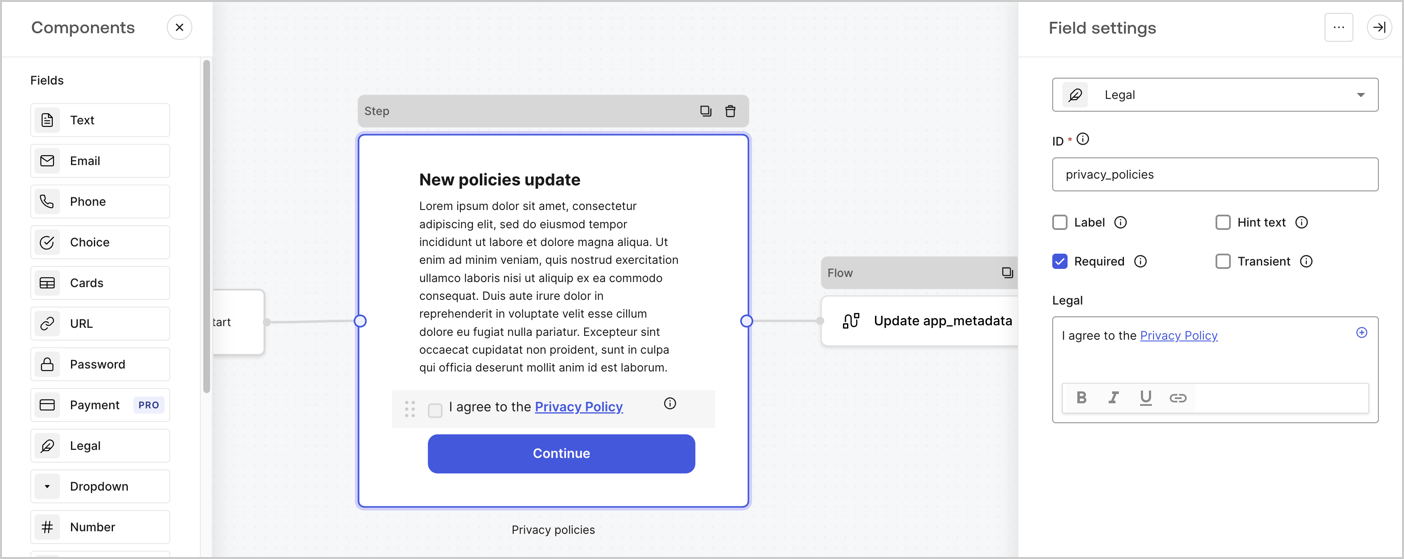
The Step node is the graphical interface visible to users. Add [Fields](/docs/customize/forms/nodes-and-components) to the Step node to collect the new agreement acceptance value by following these steps:

1. Drag a **Rich text** field from the **Components menu** into the **Step** node.

   * **Rich text**: Enter a description of your privacy policies updates.
   * Select **Save**.
2. Drag a **Legal** field into the **Step** node.

   * **ID**: Enter `privacy_policies`.
   * **Required**: Enable the checkbox.
   * **Legal**: Enter `I agree to the Privacy Policy`.
   * Select **Save**.
3. Select **Publish** to save.
<Frame>
  <img src="https://mintcdn.com/docs-dev-fix-tenant-logs-locale-nav/dqnUwvTmA8IBbzsl/docs/images/cdy7uua7fh8z/59zFFjQjAnjogkc2QGIqqJ/0ad66b1b636544122aa4e65968b76c2c/privacy-policy-step-node.png?fit=max&auto=format&n=dqnUwvTmA8IBbzsl&q=85&s=f593e37e40140cde1391461c3a8b9acb" alt="Dashboard > Actions > Forms > Use case privacy policy step node" data-og-width="1404" width="1404" data-og-height="559" height="559" data-path="docs/images/cdy7uua7fh8z/59zFFjQjAnjogkc2QGIqqJ/0ad66b1b636544122aa4e65968b76c2c/privacy-policy-step-node.png" data-optimize="true" data-opv="3" srcset="https://mintcdn.com/docs-dev-fix-tenant-logs-locale-nav/dqnUwvTmA8IBbzsl/docs/images/cdy7uua7fh8z/59zFFjQjAnjogkc2QGIqqJ/0ad66b1b636544122aa4e65968b76c2c/privacy-policy-step-node.png?w=280&fit=max&auto=format&n=dqnUwvTmA8IBbzsl&q=85&s=c41b042245ae0bf93decf3fe3262cc6a 280w, https://mintcdn.com/docs-dev-fix-tenant-logs-locale-nav/dqnUwvTmA8IBbzsl/docs/images/cdy7uua7fh8z/59zFFjQjAnjogkc2QGIqqJ/0ad66b1b636544122aa4e65968b76c2c/privacy-policy-step-node.png?w=560&fit=max&auto=format&n=dqnUwvTmA8IBbzsl&q=85&s=d7438e9a3ccf96f2feed6969381b92cc 560w, https://mintcdn.com/docs-dev-fix-tenant-logs-locale-nav/dqnUwvTmA8IBbzsl/docs/images/cdy7uua7fh8z/59zFFjQjAnjogkc2QGIqqJ/0ad66b1b636544122aa4e65968b76c2c/privacy-policy-step-node.png?w=840&fit=max&auto=format&n=dqnUwvTmA8IBbzsl&q=85&s=cb78cf5fd374a3870ecf772a399a699d 840w, https://mintcdn.com/docs-dev-fix-tenant-logs-locale-nav/dqnUwvTmA8IBbzsl/docs/images/cdy7uua7fh8z/59zFFjQjAnjogkc2QGIqqJ/0ad66b1b636544122aa4e65968b76c2c/privacy-policy-step-node.png?w=1100&fit=max&auto=format&n=dqnUwvTmA8IBbzsl&q=85&s=02019e18a29b756889e34c874eea489c 1100w, https://mintcdn.com/docs-dev-fix-tenant-logs-locale-nav/dqnUwvTmA8IBbzsl/docs/images/cdy7uua7fh8z/59zFFjQjAnjogkc2QGIqqJ/0ad66b1b636544122aa4e65968b76c2c/privacy-policy-step-node.png?w=1650&fit=max&auto=format&n=dqnUwvTmA8IBbzsl&q=85&s=4a8a7b607e0101bd6df93ed21d0c4e69 1650w, https://mintcdn.com/docs-dev-fix-tenant-logs-locale-nav/dqnUwvTmA8IBbzsl/docs/images/cdy7uua7fh8z/59zFFjQjAnjogkc2QGIqqJ/0ad66b1b636544122aa4e65968b76c2c/privacy-policy-step-node.png?w=2500&fit=max&auto=format&n=dqnUwvTmA8IBbzsl&q=85&s=75f1ddb8f35e1a3b79b8c50461502b68 2500w" />
</Frame>

### Configure the Flow node

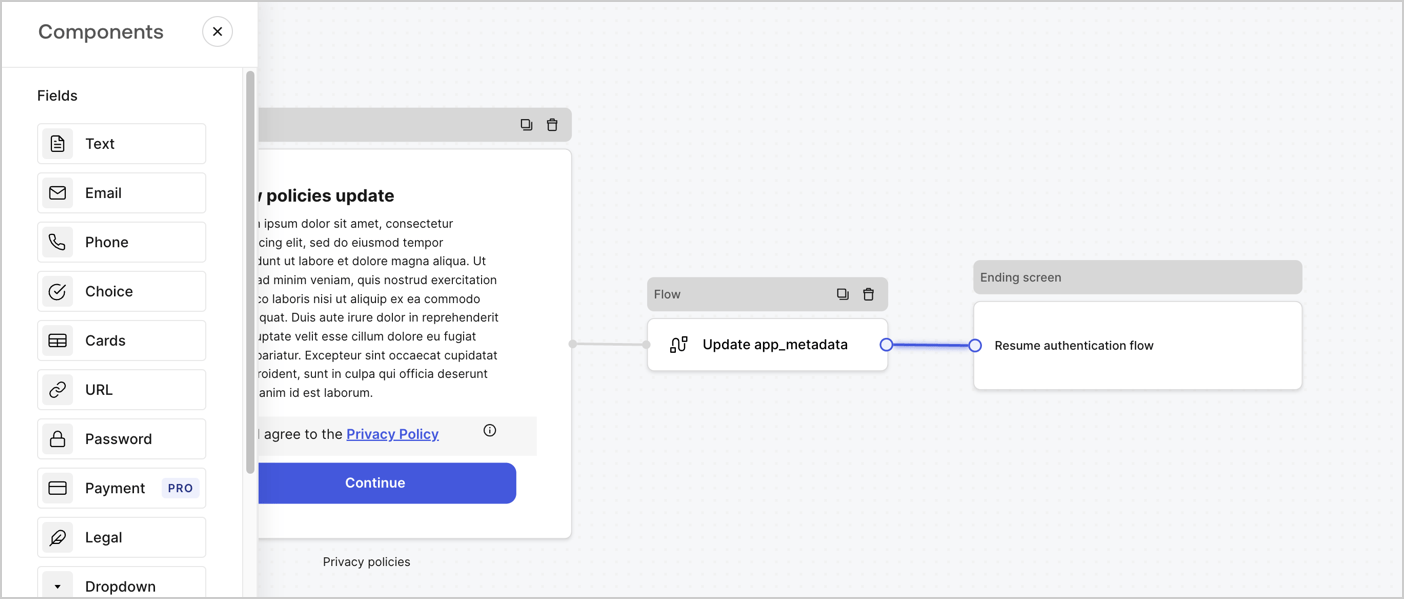
Add a **Flow** node after the **Step** node to update the `app_metadata` and resume the authentication flow by following these steps:

1. Select **Flow** from the bottom of the Form editor.
2. Remove the existing link between the **Step** and **Ending Screen** nodes.
3. Select the new **Flow** > **Click to add a flow** > **Create a new flow.**

   * Enter `Update app_metadata` in the **Name** field.
   * Select **Create**.
   * Select **Save**.
4. Link the **Flow** node to the **Step** and **Ending Screen** nodes as pictured below.
5. Select **Publish** to save.
<Frame>
  <img src="https://mintcdn.com/docs-dev-fix-tenant-logs-locale-nav/CTyFZc_GC2Gh-lke/docs/images/cdy7uua7fh8z/6YIkzm7SrpM9LW76AXuRzh/353c518fe82bbaa440836da1d83596d6/link-policies.png?fit=max&auto=format&n=CTyFZc_GC2Gh-lke&q=85&s=aeb205544b0e1aadb68cdb7068d830ea" alt="Dashboard > Actions > Forms > Form" data-og-width="1404" width="1404" data-og-height="599" height="599" data-path="docs/images/cdy7uua7fh8z/6YIkzm7SrpM9LW76AXuRzh/353c518fe82bbaa440836da1d83596d6/link-policies.png" data-optimize="true" data-opv="3" srcset="https://mintcdn.com/docs-dev-fix-tenant-logs-locale-nav/CTyFZc_GC2Gh-lke/docs/images/cdy7uua7fh8z/6YIkzm7SrpM9LW76AXuRzh/353c518fe82bbaa440836da1d83596d6/link-policies.png?w=280&fit=max&auto=format&n=CTyFZc_GC2Gh-lke&q=85&s=ebe03cb9a770294d7042b476d879b839 280w, https://mintcdn.com/docs-dev-fix-tenant-logs-locale-nav/CTyFZc_GC2Gh-lke/docs/images/cdy7uua7fh8z/6YIkzm7SrpM9LW76AXuRzh/353c518fe82bbaa440836da1d83596d6/link-policies.png?w=560&fit=max&auto=format&n=CTyFZc_GC2Gh-lke&q=85&s=868a4f8154be77e2ab0ef87d19923965 560w, https://mintcdn.com/docs-dev-fix-tenant-logs-locale-nav/CTyFZc_GC2Gh-lke/docs/images/cdy7uua7fh8z/6YIkzm7SrpM9LW76AXuRzh/353c518fe82bbaa440836da1d83596d6/link-policies.png?w=840&fit=max&auto=format&n=CTyFZc_GC2Gh-lke&q=85&s=56fa2a254cf787894215ed7d3a1b39e7 840w, https://mintcdn.com/docs-dev-fix-tenant-logs-locale-nav/CTyFZc_GC2Gh-lke/docs/images/cdy7uua7fh8z/6YIkzm7SrpM9LW76AXuRzh/353c518fe82bbaa440836da1d83596d6/link-policies.png?w=1100&fit=max&auto=format&n=CTyFZc_GC2Gh-lke&q=85&s=d25a0249a59bb8e5e3564109d7bcdab8 1100w, https://mintcdn.com/docs-dev-fix-tenant-logs-locale-nav/CTyFZc_GC2Gh-lke/docs/images/cdy7uua7fh8z/6YIkzm7SrpM9LW76AXuRzh/353c518fe82bbaa440836da1d83596d6/link-policies.png?w=1650&fit=max&auto=format&n=CTyFZc_GC2Gh-lke&q=85&s=45e326ffb904ad6ddd2395f2b00f035f 1650w, https://mintcdn.com/docs-dev-fix-tenant-logs-locale-nav/CTyFZc_GC2Gh-lke/docs/images/cdy7uua7fh8z/6YIkzm7SrpM9LW76AXuRzh/353c518fe82bbaa440836da1d83596d6/link-policies.png?w=2500&fit=max&auto=format&n=CTyFZc_GC2Gh-lke&q=85&s=43f5fd21c56e791e86eb89f33baab638 2500w" />
</Frame>

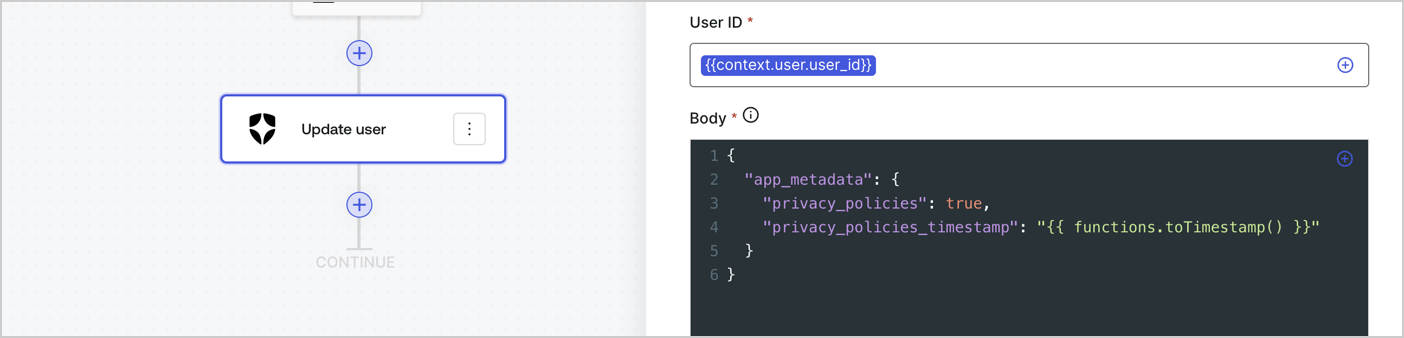
Add an Auth0 Update user action to the flow by following these steps:

1. Select the **Flow** **Update app\_metadata** > **Edit flow** to open the Flow editor in a new tab.
2. Below the StartAction, select the **+** icon to add an **Update user** action. Complete the fields below, then select **Save** to continue.

   * **Connection**: Select from the dropdown the Vault connection to your M2M application.

   * **User ID**: Enter `{{context.user.user_id}}`.

   * **Body**: Copy and paste the following code to update the app\_metadata with the privacy\_policies and privacy\_policies\_timestamp properties.

     ```text lines theme={null}
     {
       "app_metadata": {
         "privacy_policies": true,
         "privacy_policies_timestamp": "{{ functions.toTimestamp() }}"
       }
     }
     ```

   * Select **Save**.
3. Select **Publish** to save.
<Frame>
  <img src="https://mintcdn.com/docs-dev-fix-tenant-logs-locale-nav/u-whuXnpVbHnjWx_/docs/images/cdy7uua7fh8z/CvMNIwWrOUwaFW4X3G28p/1fb70ae57a20749d9ffaaba8dc0b7e26/update-user-privacy.png?fit=max&auto=format&n=u-whuXnpVbHnjWx_&q=85&s=32df87032d5248c0757ebb7068287171" alt="Dashboard > Actions > Forms > User case privacy policy code" data-og-width="1404" width="1404" data-og-height="338" height="338" data-path="docs/images/cdy7uua7fh8z/CvMNIwWrOUwaFW4X3G28p/1fb70ae57a20749d9ffaaba8dc0b7e26/update-user-privacy.png" data-optimize="true" data-opv="3" srcset="https://mintcdn.com/docs-dev-fix-tenant-logs-locale-nav/u-whuXnpVbHnjWx_/docs/images/cdy7uua7fh8z/CvMNIwWrOUwaFW4X3G28p/1fb70ae57a20749d9ffaaba8dc0b7e26/update-user-privacy.png?w=280&fit=max&auto=format&n=u-whuXnpVbHnjWx_&q=85&s=cb70fd55318b421e5958f71f4c0273c6 280w, https://mintcdn.com/docs-dev-fix-tenant-logs-locale-nav/u-whuXnpVbHnjWx_/docs/images/cdy7uua7fh8z/CvMNIwWrOUwaFW4X3G28p/1fb70ae57a20749d9ffaaba8dc0b7e26/update-user-privacy.png?w=560&fit=max&auto=format&n=u-whuXnpVbHnjWx_&q=85&s=d95467f1a868dc8c4a825edf49d71f16 560w, https://mintcdn.com/docs-dev-fix-tenant-logs-locale-nav/u-whuXnpVbHnjWx_/docs/images/cdy7uua7fh8z/CvMNIwWrOUwaFW4X3G28p/1fb70ae57a20749d9ffaaba8dc0b7e26/update-user-privacy.png?w=840&fit=max&auto=format&n=u-whuXnpVbHnjWx_&q=85&s=5a0397b792270ddb02a594d5725e8aa6 840w, https://mintcdn.com/docs-dev-fix-tenant-logs-locale-nav/u-whuXnpVbHnjWx_/docs/images/cdy7uua7fh8z/CvMNIwWrOUwaFW4X3G28p/1fb70ae57a20749d9ffaaba8dc0b7e26/update-user-privacy.png?w=1100&fit=max&auto=format&n=u-whuXnpVbHnjWx_&q=85&s=83a9946fdaa3be4086cb4cecdac614f4 1100w, https://mintcdn.com/docs-dev-fix-tenant-logs-locale-nav/u-whuXnpVbHnjWx_/docs/images/cdy7uua7fh8z/CvMNIwWrOUwaFW4X3G28p/1fb70ae57a20749d9ffaaba8dc0b7e26/update-user-privacy.png?w=1650&fit=max&auto=format&n=u-whuXnpVbHnjWx_&q=85&s=8d67c52df81a5c5a45f67a71a1ecfab2 1650w, https://mintcdn.com/docs-dev-fix-tenant-logs-locale-nav/u-whuXnpVbHnjWx_/docs/images/cdy7uua7fh8z/CvMNIwWrOUwaFW4X3G28p/1fb70ae57a20749d9ffaaba8dc0b7e26/update-user-privacy.png?w=2500&fit=max&auto=format&n=u-whuXnpVbHnjWx_&q=85&s=574121b6df7ebd4010f3c21c0086194c 2500w" />
</Frame>

<Callout icon="file-lines" color="#0EA5E9" iconType="regular">
  The flow **Update app\_metadata** adds a `privacy_policies true` value to the app`_metadata` object and also generates a timestamp with a [helper function.](/docs/customize/forms/variables)
</Callout>

## Retrieve the form render code

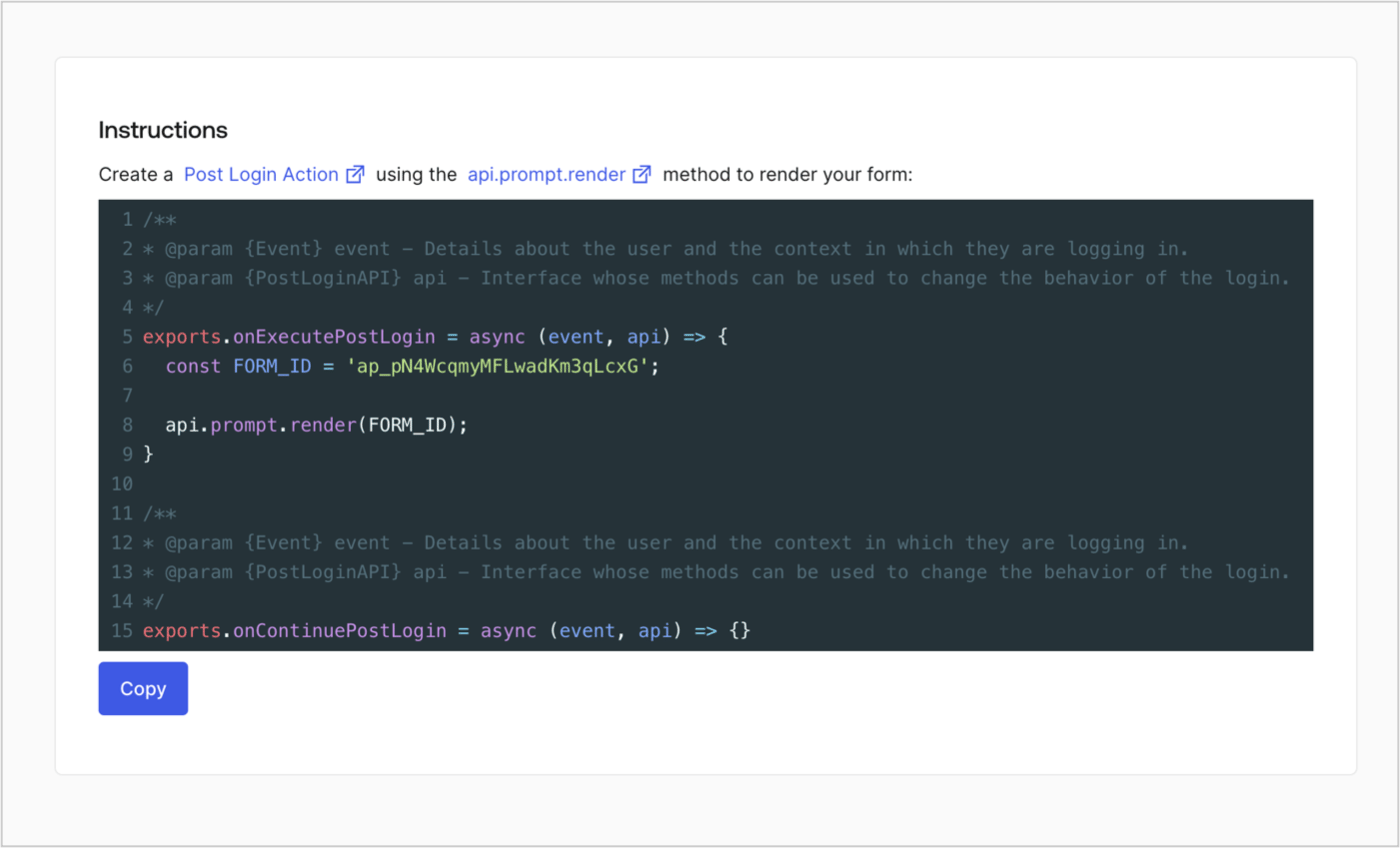
Retrieve your form render code to visually render the form with a custom Post Login Action by following these steps:

* From the Form editor, select **`<> Render`**.
* Select **Copy**.
<Frame>
  <img src="https://mintcdn.com/docs-dev-fix-tenant-logs-locale-nav/dXzmybCdAj07nI-j/docs/images/cdy7uua7fh8z/2EIUzc539sq9lwoTKbjoJv/496a864c0fc44a782c9cadca119dbfb0/embed.png?fit=max&auto=format&n=dXzmybCdAj07nI-j&q=85&s=0f3e2a95421c2e031af3249c4a18939e" alt="Dashboard > Actions > Forms > Form > Embed" data-og-width="1400" width="1400" data-og-height="848" height="848" data-path="docs/images/cdy7uua7fh8z/2EIUzc539sq9lwoTKbjoJv/496a864c0fc44a782c9cadca119dbfb0/embed.png" data-optimize="true" data-opv="3" srcset="https://mintcdn.com/docs-dev-fix-tenant-logs-locale-nav/dXzmybCdAj07nI-j/docs/images/cdy7uua7fh8z/2EIUzc539sq9lwoTKbjoJv/496a864c0fc44a782c9cadca119dbfb0/embed.png?w=280&fit=max&auto=format&n=dXzmybCdAj07nI-j&q=85&s=d19cd780ee4ef4b72f646925874d2283 280w, https://mintcdn.com/docs-dev-fix-tenant-logs-locale-nav/dXzmybCdAj07nI-j/docs/images/cdy7uua7fh8z/2EIUzc539sq9lwoTKbjoJv/496a864c0fc44a782c9cadca119dbfb0/embed.png?w=560&fit=max&auto=format&n=dXzmybCdAj07nI-j&q=85&s=4317955d6ea0129cc5c6a50fef55e3fa 560w, https://mintcdn.com/docs-dev-fix-tenant-logs-locale-nav/dXzmybCdAj07nI-j/docs/images/cdy7uua7fh8z/2EIUzc539sq9lwoTKbjoJv/496a864c0fc44a782c9cadca119dbfb0/embed.png?w=840&fit=max&auto=format&n=dXzmybCdAj07nI-j&q=85&s=52d85fe42a99519b6a95ea1d7ee40a03 840w, https://mintcdn.com/docs-dev-fix-tenant-logs-locale-nav/dXzmybCdAj07nI-j/docs/images/cdy7uua7fh8z/2EIUzc539sq9lwoTKbjoJv/496a864c0fc44a782c9cadca119dbfb0/embed.png?w=1100&fit=max&auto=format&n=dXzmybCdAj07nI-j&q=85&s=e4373e158e1fb7d43034ca90796d6af1 1100w, https://mintcdn.com/docs-dev-fix-tenant-logs-locale-nav/dXzmybCdAj07nI-j/docs/images/cdy7uua7fh8z/2EIUzc539sq9lwoTKbjoJv/496a864c0fc44a782c9cadca119dbfb0/embed.png?w=1650&fit=max&auto=format&n=dXzmybCdAj07nI-j&q=85&s=c7fedbcf1d4c98e03aaf269cf26ab930 1650w, https://mintcdn.com/docs-dev-fix-tenant-logs-locale-nav/dXzmybCdAj07nI-j/docs/images/cdy7uua7fh8z/2EIUzc539sq9lwoTKbjoJv/496a864c0fc44a782c9cadca119dbfb0/embed.png?w=2500&fit=max&auto=format&n=dXzmybCdAj07nI-j&q=85&s=f52eb49048522d85b9639c24945ddc1e 2500w" />
</Frame>

## Create a Post Login Action

Create a post-login Action to render your form by following these steps:

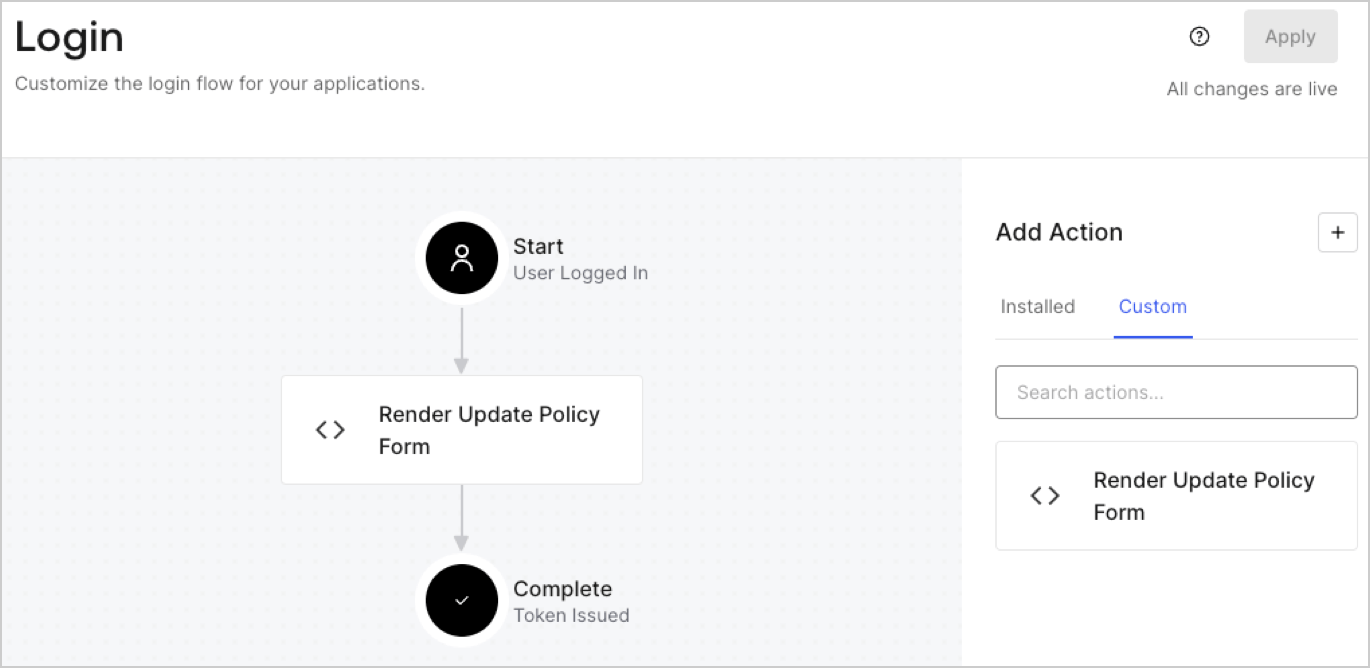
1. Navigate to **Auth0 Dashboard > Actions > Flows > Login.**
2. Select the **+** icon and Select **Build from scratch**:

   * **Name**: Enter `Render Update Policy Form`.
   * **Trigger**: Select `Login / Post Login`.
   * **Runtime**: Select the recommended version.
3. Select **Create**.

To configure the post-login Action:

1. Delete the existing code from the Code editor.
2. Paste the form render code into the Code editor.
3. Edit the code to define the conditional logic that will render the form.

   ```javascript lines theme={null}
   /**
   * @param {Event} event - Details about the user and the context in which they are logging in.
   * @param {PostLoginAPI} api - Interface whose methods can be used to change the behavior of the login.
   */
   exports.onExecutePostLogin = async (event, api) => {
     const FORM_ID = 'REPLACE_WITH_YOUR_FORM_ID';

     if (event.user.app_metadata.privacy_policies !== true) {
       api.prompt.render(FORM_ID);
     }
   }

   exports.onContinuePostLogin = async (event, api) => { }
   ```

   <Callout icon="file-lines" color="#0EA5E9" iconType="regular">
     The example code above will render the form when a user is missing the app metadata `privacy_policies` property.
   </Callout>
4. Select **Deploy.**
5. Drag and Drop the **Render Update Policy Form** Action to the **Login** flow.
   <Frame>
     <img src="https://mintcdn.com/docs-dev-fix-tenant-logs-locale-nav/K12oK3drd3foHHcI/docs/images/cdy7uua7fh8z/5TOwDgevZsBqd7yZynUYWU/41ca909dc3007aed4f40ff794a05efa5/postlogin.png?fit=max&auto=format&n=K12oK3drd3foHHcI&q=85&s=4b3b40423456ceadc6ddb25847ec7272" alt="Dashboard > Forms > Use Case > Render update policy form login action" data-og-width="1370" width="1370" data-og-height="668" height="668" data-path="docs/images/cdy7uua7fh8z/5TOwDgevZsBqd7yZynUYWU/41ca909dc3007aed4f40ff794a05efa5/postlogin.png" data-optimize="true" data-opv="3" srcset="https://mintcdn.com/docs-dev-fix-tenant-logs-locale-nav/K12oK3drd3foHHcI/docs/images/cdy7uua7fh8z/5TOwDgevZsBqd7yZynUYWU/41ca909dc3007aed4f40ff794a05efa5/postlogin.png?w=280&fit=max&auto=format&n=K12oK3drd3foHHcI&q=85&s=4fcfe87c4c8d53b89819aee5dd9f9a3c 280w, https://mintcdn.com/docs-dev-fix-tenant-logs-locale-nav/K12oK3drd3foHHcI/docs/images/cdy7uua7fh8z/5TOwDgevZsBqd7yZynUYWU/41ca909dc3007aed4f40ff794a05efa5/postlogin.png?w=560&fit=max&auto=format&n=K12oK3drd3foHHcI&q=85&s=6af06b70fe4f76faf3391228d42d5667 560w, https://mintcdn.com/docs-dev-fix-tenant-logs-locale-nav/K12oK3drd3foHHcI/docs/images/cdy7uua7fh8z/5TOwDgevZsBqd7yZynUYWU/41ca909dc3007aed4f40ff794a05efa5/postlogin.png?w=840&fit=max&auto=format&n=K12oK3drd3foHHcI&q=85&s=6121a5a2bab4c398d12c94e23497c286 840w, https://mintcdn.com/docs-dev-fix-tenant-logs-locale-nav/K12oK3drd3foHHcI/docs/images/cdy7uua7fh8z/5TOwDgevZsBqd7yZynUYWU/41ca909dc3007aed4f40ff794a05efa5/postlogin.png?w=1100&fit=max&auto=format&n=K12oK3drd3foHHcI&q=85&s=9bef5f129dd4cd5426a531b941c8a2a3 1100w, https://mintcdn.com/docs-dev-fix-tenant-logs-locale-nav/K12oK3drd3foHHcI/docs/images/cdy7uua7fh8z/5TOwDgevZsBqd7yZynUYWU/41ca909dc3007aed4f40ff794a05efa5/postlogin.png?w=1650&fit=max&auto=format&n=K12oK3drd3foHHcI&q=85&s=8b590412ea251554f315794c4287afd5 1650w, https://mintcdn.com/docs-dev-fix-tenant-logs-locale-nav/K12oK3drd3foHHcI/docs/images/cdy7uua7fh8z/5TOwDgevZsBqd7yZynUYWU/41ca909dc3007aed4f40ff794a05efa5/postlogin.png?w=2500&fit=max&auto=format&n=K12oK3drd3foHHcI&q=85&s=95dd9d42b37ffddac08ac100aeb0f770 2500w" />
   </Frame>
6. Select **Apply.**

### Test implementation

Test the implementation by following these steps:

1. Log in with an existing user whose app`_metadata` attribute `privacy_policies` does not have a value.
2. The post-login Action in the Login flow will render the form and prompt for acceptance.
3. Select **Auth0 Dashboard > User Management > Users,** locate the user and verify that the `app_metadata` attribute `privacy_policies` contains a `true` value and a timestamp.
